
Download Virtual Stage Camera – video editing app, virtual stage camera, green screen, video effects, mobile video production, content creation tool
Overview
Virtual Stage Camera is a free Android application developed by Roland Corporation, designed to empower mobile creators with tools for professional-grade video production. The app enables users to shoot videos in any real-world location and seamlessly edit them to appear as if filmed on a stage. This functionality is particularly useful for content creators, vloggers, and independent producers seeking to enhance their visual storytelling without the need for physical studio setups. By leveraging virtual backgrounds and chroma key technology, the app allows users to replace their surroundings with dynamic stage-like environments, adding a polished, cinematic quality to their footage.
The software is optimized for on-the-go content creation, making it ideal for individuals who prioritize mobility and creativity. Whether recording tutorials, live performances, or social media content, users can transform ordinary scenes into visually compelling productions. The app integrates core video editing functions such as background replacement, audio mixing, and special effects, streamlining the production workflow within a single interface. While the developer did not provide additional details about the target user base beyond general content creators, the app’s feature set suggests strong utility for both amateur and semi-professional users.
Key Features & Capabilities
- Virtual Background Integration – Replace real-world surroundings with customizable stage-like environments, enabling users to simulate a professional studio setup regardless of physical location.
- Chroma Key Support (Green/Blue Screen) – Apply green or blue screen effects to isolate subjects and overlay them onto virtual stages, enhancing visual flexibility during editing.
- Integrated Audio Mixer – Combine voiceovers, music tracks, and sound effects in real time or during post-production, allowing for layered audio that complements the video content.
- Video Effects and Filters – Apply a range of visual effects and filters to enhance mood, clarity, and aesthetic appeal, making videos more engaging and professional.
- On-Device Video Editing – Perform editing tasks directly on the Android device, including background changes, transitions, and effect application, reducing dependency on external software.
These capabilities support real-world use cases such as creating YouTube vlogs with dynamic stage backgrounds, producing promotional clips for music or performances, or crafting social media content with high visual impact. The app’s design emphasizes simplicity and accessibility, allowing users to achieve polished results without extensive technical knowledge. While specific performance benchmarks were not provided, the integration of multiple editing tools within a single mobile application suggests a streamlined workflow tailored to mobile-first creators.
User Interface, Workflow & Performance
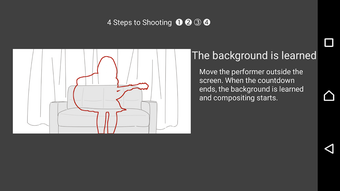
The user interface of Virtual Stage Camera appears structured around intuitive navigation, with dedicated sections for video capture, editing, and output settings. Users can access background selection, chroma key adjustment, audio mixing, and filter application through a clean, touch-friendly layout. The workflow is designed to guide users from recording to final export in a logical sequence, minimizing the need for switching between multiple apps.
Navigation is expected to be responsive on supported Android devices, though exact performance metrics were not specified. The developer did not provide information on CPU or RAM usage, so resource behavior remains unknown. However, based on general patterns of mobile video editing tools, the app likely manages processing demands efficiently to maintain smooth operation during editing tasks. Stability during prolonged use or high-resolution video processing was not detailed, but the app’s free status and mobile-first approach suggest a focus on reliability within typical usage scenarios.
Compatibility & System Requirements
Virtual Stage Camera is designed for Android operating systems and is available in version 1.0.0. The installation size is 45.6 MB, indicating a lightweight footprint suitable for most modern Android devices. Compatibility information was partially provided, with no specific hardware requirements or minimum OS versions disclosed. The developer did not specify whether the app supports older Android versions or particular device models.
Exact system requirements were not listed, and no information was provided about supported screen resolutions or camera specifications. Users should ensure their device has a functional front or rear-facing camera, as video capture is a core function. The app’s ability to process real-time chroma key effects may depend on device processing power, but no performance thresholds were defined. For optimal experience, users are advised to test the app on their device prior to extensive use.
Pros and Cons
Pros
- Free to download and use, lowering the barrier to entry for mobile creators.
- Offers advanced video editing features like chroma key and virtual backgrounds.
- Integrated audio mixer enables layered sound production without external tools.
- Lightweight installation size (45.6 MB) ensures easy storage management.
- Designed for on-the-go video production, ideal for vloggers and content creators.
Cons
- Exact system requirements and supported Android versions were not specified.
- Performance under high-resolution video processing remains unverified.
- Limited information on stability during extended editing sessions.
- Audio and video quality outcomes may vary based on device hardware.
- No details on update frequency or long-term support from the developer.
FAQ Section
Is Virtual Stage Camera compatible with all Android devices?
Compatibility information is limited. While the app is designed for Android, specific device or OS version requirements were not provided by the developer.
Is the app safe to download and use?
Virtual Stage Camera is published by Roland Corporation, a reputable company in audio and video technology. The app is free and available through official Android channels, reducing the risk of malware.
Does Virtual Stage Camera require an internet connection?
The app supports offline functionality for video capture and editing. However, some features may require online access for updates or cloud-based assets, though this was not confirmed.
Can I use Virtual Stage Camera without a green screen?
Yes. The app supports both green and blue screen chroma key effects, but it can also use virtual backgrounds without physical chroma key setups.
Is there a license type or subscription model?
Virtual Stage Camera is currently free to use with no indication of future subscription plans. The developer did not specify a license type beyond its free availability.
Final Thoughts + CTA
Virtual Stage Camera presents a compelling option for mobile content creators seeking to elevate their video production quality without investing in studio equipment. Its integration of virtual backgrounds, chroma key functionality, audio mixing, and visual effects within a single lightweight app makes it a versatile tool for vloggers, performers, and digital storytellers. While specific technical details such as system requirements and performance metrics are limited, the app’s core features are well-aligned with modern mobile production needs.
For users who value creativity, mobility, and professional results, Virtual Stage Camera delivers strong value—especially given its free price point. While some aspects remain unclear due to incomplete documentation, the app’s foundation is solid and purpose-built for real-world content creation. With its intuitive workflow and feature-rich design, it stands out as a practical solution for enhancing mobile video output.
Download Virtual Stage Camera now






.png)
